
- New

References :
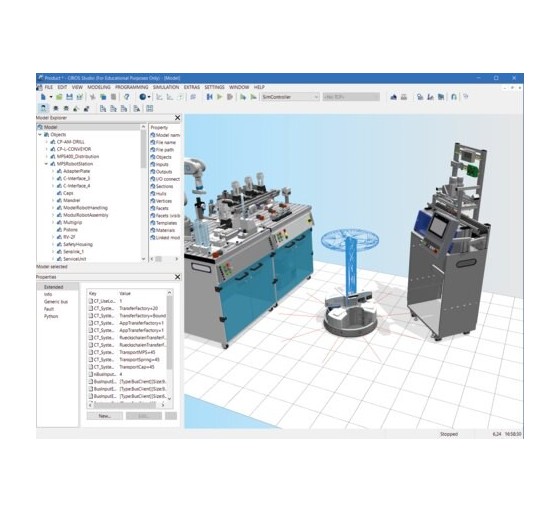
CIROS® 7 is a professional 3D simulation platform designed for industrial automation, robotics and technical training. It enables users to design, simulate and validate automated systems, robotic workcells and production lines in a realistic virtual environment. With extensive model libraries, industrial interfaces and advanced programming capabilities, CIROS® 7 provides a comprehensive solution for education, research and the development of automation skills.
The "Studio" version includes advanced modelling and simulation tools, external controller integration, robot programming, fault simulation and the preparation of educational scenarios. The license allows permanent use of the version available at the time of purchase and includes updates for the following two years.
CIROS® 7 is a powerful, industry-proven 3D simulation platform designed for the modelling, programming and simulation of automation systems. It combines advanced design tools with educational features for creating learning environments tailored to technical schools, vocational training centres, engineering institutions and research laboratories.
The platform supports the use of predefined models, the development of new virtual installations, the integration of industrial interfaces and the implementation of customised solutions, including those developed using Python.
CIROS® 7 includes an extensive library of models and resources designed to support progressive learning in industrial automation and robotics.
Simulated models can be controlled using different solutions, depending on the selected training or research architecture.
The fault simulation mode makes it possible to reproduce malfunction scenarios and develop exercises in fault diagnosis, troubleshooting and maintenance. The behaviour of selected components can be adapted to create educational scenarios that match specific training objectives.
This approach enables learners to practise identifying faults, analysing possible causes and applying a structured recovery procedure without unnecessarily exposing physical equipment to operational risks.
CIROS® 7 adapts to a wide range of learning environments, from individual workstations to robotic stations and classrooms dedicated to virtual learning factories. The platform supports lesson preparation, scenario development, skills assessment and experimentation with automation solutions.
CIROS Studio
A license intended for teachers, trainers and researchers. It enables users to create new scenarios, prepare educational activities, configure projects, incorporate fault behaviour and prepare distributed working environments. It also supports connections to selected compatible physical robot controllers.
CIROS Education
A license intended for learners and students. It enables users to work with predefined models or models supplied by an instructor, run simulations and generate outputs in the form of programs or simulation videos.
CIROS Cyber-Physical Library (CP-L)
Activating this license unlocks the extended model and resource library associated with the CP Factory and CP Lab environments.
Manufacturing Execution System 4 (MES4)
This license enables the standalone MES4 V1 software to be fully commissioned for implementing an educational digital twin of a learning factory comprising CP Factory, CP Lab and MPS 400 systems.
Licenses are supplied digitally by default. Depending on the selected configuration, activation can be performed using a USB license key, on a local computer or through a trainer license.
The trainer license allows users to generate sub-licenses with independently defined expiry periods. This option is particularly suitable for training centres and environments where equipment and workstations may be used across different locations.
Purchasing a license grants permanent use of the version available at the time of purchase. Updates are included for the following two years. Digital delivery can be completed within a few working days, depending on order processing arrangements.
CIROS® 7 supports OpenVR for virtual reality simulation applications. Using this feature requires, among other things, a free Steam account and compatible virtual reality equipment.
Note: performance depends on model complexity, the number of simulated elements and the features being used. More powerful hardware may be required for demanding projects or virtual reality applications.

Reference : 549786
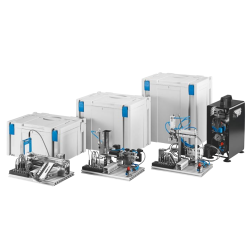
Automated systems are now an integral part of nearly every industry. With the MecLab® system from Festo Didactic, students gain a practical understanding of how automation technology is applied in real production environments.
The three MecLab stations represent simplified models of typical production processes found in modern automated manufacturing facilities. They provide a realistic yet accessible platform for learning the fundamentals of industrial automation.
MecLab® covers a wide range of topics and competencies, including:
Référence : E6 Training Station
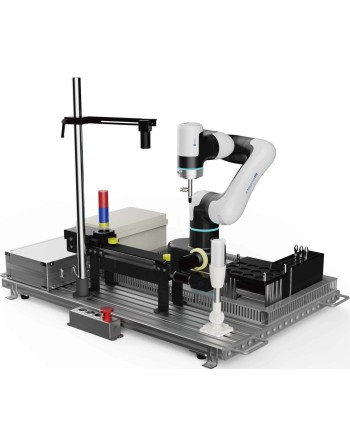
The Collaborative Robot Universal Training Platform is a comprehensive teaching solution designed for vocational education and industrial training centers. It integrates a collaborative robot, control system, vision system, conveyor belt, and various modular components.
With its modular design, the platform offers high flexibility and enables easy simulation of automation scenarios such as object detection, picking, handling, palletizing, and assembly. It also supports educational projects including robot calibration, trajectory tracking, and industrial communication.
This solution helps learners acquire essential skills in smart robotics while enhancing their practical and innovative capabilities.
Comprehensive Functionality
The platform supports teaching of robotic calibration, trajectory tracking, communication, and more. Combined with workpiece models, it enables tasks such as object tracking, picking, inspection, transportation, palletizing, and assembly.
Ease of Use
By integrating lightweight collaborative robots (compatible with CR3, E6, and MG400) and flexible modular units, users can easily create automation applications.
High Versatility
The system covers robotics, machine vision, and optional PLC systems. After training, users can handle most automation tasks. The conveyor belt kit can also operate independently.
References :
CIROS® 7 is a professional 3D simulation platform designed for industrial automation, robotics and technical training. It enables users to design, simulate and validate automated systems, robotic workcells and production lines in a realistic virtual environment. With extensive model libraries, industrial interfaces and advanced programming capabilities, CIROS® 7 provides a comprehensive solution for education, research and the development of automation skills.
The "Studio" version includes advanced modelling and simulation tools, external controller integration, robot programming, fault simulation and the preparation of educational scenarios. The license allows permanent use of the version available at the time of purchase and includes updates for the following two years.